OpenMontage is one of the fastest-rising open-source AI projects of 2026 — it crossed tens of thousands of GitHub stars within days of launch and briefly topped GitHub Trending. If you keep seeing the name and want a plain-English answer to what OpenMontage is, how to use it, and whether it can replace tools like HeyGen, Synthesia, or VisionStory, this guide covers it. Source project: github.com/calesthio/OpenMontage (GNU AGPL-3.0).
What is OpenMontage?
OpenMontage is an open-source, agent-driven framework that turns an AI coding assistant — such as Claude Code, Cursor, Copilot, Codex, or Windsurf — into a complete video production studio. Instead of clicking around a timeline, you describe the video you want in plain language, and the agent runs the whole pipeline for you: web research, scripting, scene planning, asset generation, editing, and the final render.
The key thing to understand: OpenMontage is a developer tool, not a hosted website. There is no sign-up page and no browser app. You install it locally with Python, Node.js, and FFmpeg, then drive it through your AI coding assistant. That makes it extremely flexible and free to run, but it also means there is real setup involved.
How OpenMontage works: the pipeline
OpenMontage has no centralized orchestrator. Your AI assistant reads human-readable YAML production manifests and Markdown skill files, then calls Python tools stage by stage. Every pipeline roughly follows the same path:
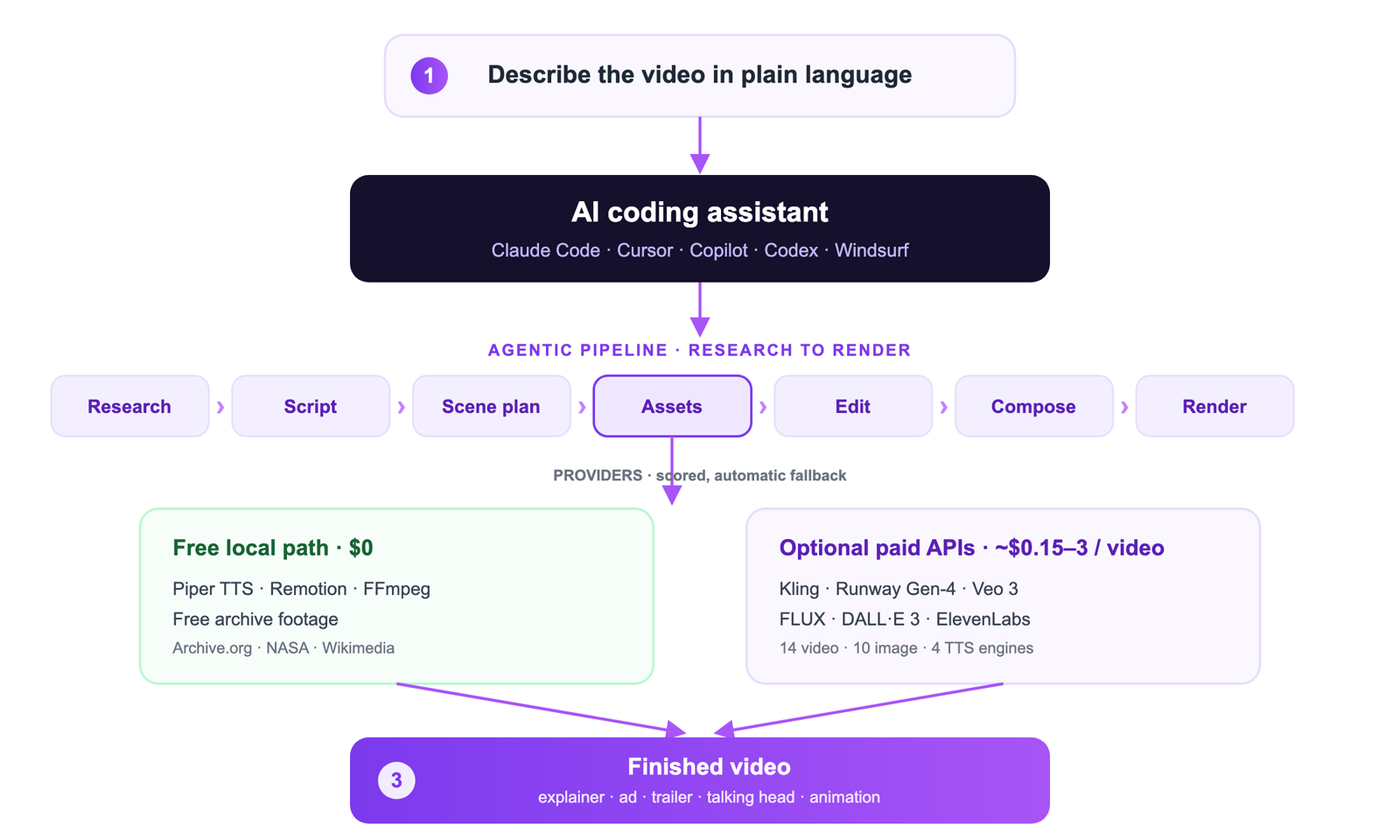
For asset generation it can pull real stock and motion footage from free archives like Archive.org, NASA, and Wikimedia, or call paid generation APIs when you provide keys. Provider selection is scored with automatic fallback, and each stage logs its reasoning and an estimated cost, so the run is auditable.
Key features at a glance
- 12 production pipelines — explainers, talking heads, screen demos, trailers, animations, documentary montages, podcast repurposing, and localization.
- 52+ production tools and 500+ agent skills spanning video generation, image generation, text-to-speech, music, subtitles, and enhancement.
- Multi-provider with scored fallback — 14 video generators, 10 image tools, and 4 TTS systems, including optional Kling, Runway Gen-4, Veo 3, FLUX, DALL-E 3, and ElevenLabs.
- A genuine zero-cost path using offline Piper TTS, Remotion rendering, FFmpeg, and free archive footage — no paid API required.
- Reference-driven creation — point it at a YouTube clip or reel and it analyzes pacing and style to produce variants.
- Quality and budget gates — pre-composition validation, post-render self-review, spend caps, and per-action approval thresholds.
How to use OpenMontage: step-by-step setup
OpenMontage is run locally, so you will need a few prerequisites before your first video.
Prerequisites
- Python 3.10 or newer
- Node.js 18 or newer
- FFmpeg installed and on your PATH
- An AI coding assistant (Claude Code, Cursor, Copilot, Codex, or Windsurf)
Setup
- Clone the repository. Run
git clone https://github.com/calesthio/OpenMontageandcd OpenMontage. - Install dependencies. Run
make setupto install the Python and Node toolchain. - Add API keys (optional). If you want premium generation, add provider keys to your environment. Skip this to stay on the free local path.
- Prompt your assistant. Open the project in your AI coding assistant and describe the video, for example: make a 60-second animated explainer about neural networks. The agent handles research, script, assets, editing, and render.
Because the official project does not yet ship a step-by-step tutorial, expect to read the included AGENT_GUIDE and skill files the first time through.
How much does OpenMontage cost?
OpenMontage itself is free and open-source under AGPL-3.0. Your real cost depends on which providers you use:
- Free local path: Piper TTS, Remotion, FFmpeg, and free archive footage cost nothing beyond your own hardware and time.
- Premium APIs: when you plug in paid video, image, or voice generators, a single short video typically lands somewhere around 0.15 to 3 US dollars, depending on length and which models you call.
There is no subscription and no per-seat pricing, which is a big part of the appeal for developers — but you are trading money for setup time and maintenance.
What you can make with it
The project showcases its range through a demo gallery on its official YouTube channel — cinematic trailers, 60-second animated shorts, history mini-documentaries, product ads with data visualization, and anime-style pieces, several produced for well under two dollars. It is a strong fit for explainers, social shorts, marketing clips, and educational content where you want full control over every scene.
Demo videos by OpenMontage (github.com/calesthio/OpenMontage), embedded for reference.
OpenMontage vs hosted AI video tools (VisionStory, HeyGen, Synthesia)
This is where most people land, so let us be honest about it: OpenMontage and hosted avatar tools solve different problems.
- Choose OpenMontage if you are comfortable with Python and FFmpeg, you want pipeline-level control across many providers, and you value a free local path more than speed.
- Choose a hosted tool if you just want a finished video fast, with no setup. VisionStory turns a single photo or script into a lip-synced talking avatar video right in your browser in minutes — no Python, no FFmpeg, no API keys.
If your goal specifically is a talking presenter or spokesperson video, a hosted avatar tool will almost always be quicker. You can see how the hosted options stack up in our breakdowns of VisionStory vs HeyGen and VisionStory vs Synthesia, or jump straight into AI video creation.
Want a talking video without installing anything? Try VisionStory free — upload a photo, type a script, and get a shareable talking avatar video in minutes.