
Hypit landed on GitHub on July 29, 2026 and passed 8,000 stars within days. By September 22 it had more than 13,000 stars and 1,500 forks, and it topped Trendshift’s daily chart. Its pitch is blunt: clone any viral video with AI agents. We installed it, ran seven real tasks through Codex and Claude Code, and recorded what it made, how it works under the hood and what it actually cost. This is that teardown. Source: github.com/hypit-ai/hypit.
What is Hypit?
Hypit, from Hypit.AI, gives AI coding agents such as Claude Code and Codex “a language and system to create video.” It is not a hosted editor. It ships as an agent Skill, a command-line tool and a TypeScript monorepo of 122 packages: connectors for Seedance, GPT Image, Nano Banana, Grok Imagine, MiniMax, ElevenLabs and Fish Audio, plus captions, background removal, B-roll tracks, film effects and a renderer.
The core idea is SVML, Hypit’s own markup language. Your agent writes the video as SVML; Hypit compiles it and renders the frames (its examples render in 64 parallel headless Chromium processes). Timing is anchored to words, not seconds. WhisperX aligns every spoken word, and visuals attach to spans of the script. This is real code from the repo’s football tier-list example:
<HOST>Ronaldo is <D | Dee> tier. || Bro has @{hair-gel} more ||
  hair gel than @{trophy} trophies || at this point.@{/trophy}@{/hair-gel}

<media-track:Item id="hair-gel" image={broll-hair-gel.image}
  extent={hair-gel-extent} during={story.selection.hair-gel}
  motion={recipes.motion.broll-left}/>
The hair-gel B-roll image is on screen exactly while those words are spoken. Rewrite the line and the timing re-flows by itself, which is why one project can spin off dozens of variants.
Three more things worth knowing before you install it:
- Generation models are optional. A project can compile captions, motion graphics and code-rendered visuals into a finished video without calling any video model.
- You pay the services, not Hypit. Hypit is free; your coding agent and model providers bill separately. Its recommended hosted service, HypiHub, sold credits at $15 for 2,000 in our run, and you can plug in your own API keys or local models instead.
- The license has conditions. The “Hypit Open Source License” is Apache 2.0 with extra terms: you may use it commercially inside your own organization, but hosting it as a multi-tenant service for others or reselling it needs a commercial license. The videos you make belong to you.
How it works: what we saw in our runs
Installing it is one command: npx skills add hypit-ai/hypit -g. On first use the agent finds or installs the Hypit executable (Node.js 22.15 or newer). From there, every task followed the same loop.
1. The agent watches and breaks down the reference
We gave Codex a 34-second finance explainer and typed “Hypit, copy this video.” It watched the clip, described its structure (a talking-head intro followed by five market charts stacked one after another, with zooms and exaggerated contrasts) and proposed a plan: keep the host, voice and script, and rebuild the charts, captions and camera moves as editable elements. Then it asked what we wanted to replace.
2. It prices the job before spending anything
This was the most reassuring part. Before any paid call, the agent laid out a cost table and waited. For a Chinese talking-head clip it quoted 4.39 credits (about $0.03) to transcribe the original and rebuild it locally, versus $5.69–9.34, before retries, to regenerate all 132 seconds of on-camera footage at 720p. It then asked permission to charge at most 10 credits (about $0.075) for the transcription alone, noting that “no paid calls have been made yet.”
3. It builds, renders and hands you an editable project
Once approved, the agent generates the pieces, compiles the SVML and renders. You get a finished file and the project behind it, which opens in Hypit Studio: source on the left, preview in the middle, properties on the right and a multi-track timeline below. You can edit by hand or ask the agent to review and fix the cut itself.
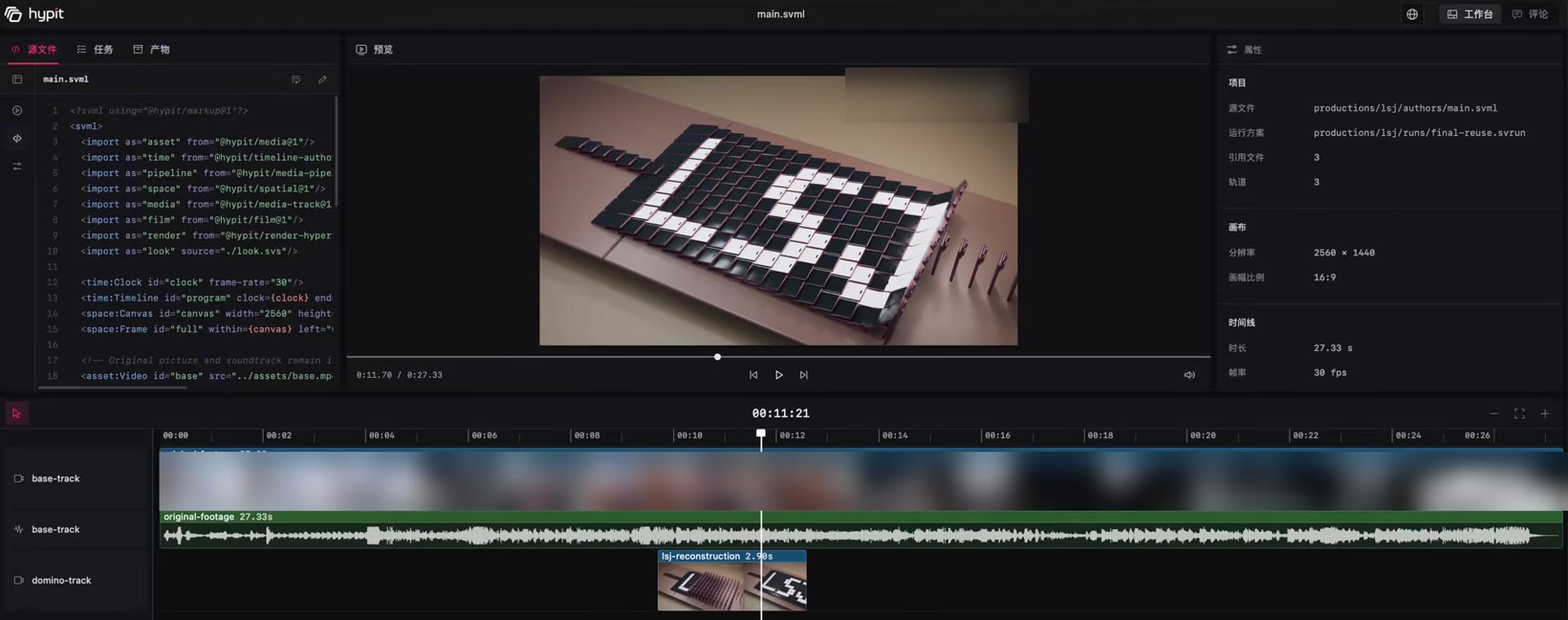
lsj-reconstruction clip on its own track; the original footage underneath is untouched. Third-party footage is blurred.We actually ran it: seven tasks
We ran seven tasks through the Codex and Claude Code desktop apps, using Seedance 2 Mini for video and GPT Image 2 for images. Here is what each one produced:
- Talking-head motion graphics. We asked it to copy a creator’s torn-paper, sticker-and-tape editing style onto one of our own talking-head clips. It rebuilt the look convincingly.
- Outfit swap. A trending try-on video with the outfit replaced by a video-game costume. It held up in most shots.
- Style transfer. A meme clip redrawn in a well-known adult-animation style. It used the original clip as the base and restyled on top, and the result was genuinely good.
- Subject swap. A viral singing video with about a million likes, with the two performers replaced by two cats. There were small flaws, but it was strong overall (first clip below).
- Same style, new content. From a popular finance explainer, the agent wrote a new “Why HBM matters” script, drew the diagrams in code and generated an on-camera presenter for the top-left corner. Its report: “Exported, 37.1 s, 1080p … only the first round of generation ran; no additional paid generation.” The whole task took 1 hour 8 minutes of agent time.
- The Blender surprise. Asked to swap the initials spelled out in dominoes in a tech reviewer’s video, it skipped video models entirely. It rebuilt the shot in Blender, rendered 87 frames (2.9 seconds at 30 fps) and spliced them into otherwise unchanged footage. It was the most surgical fix of the week.
- Cinematic phone review. A film-style product review remade with a digital presenter and generated B-roll (second clip below). Overall this was the weakest result: the AI look was obvious, and it sits well behind a human editor.
- E-commerce skit. From one reference image and the source video, it remade a short sales skit in which a doll smashes eggs with a hammer. We rated it roughly on par with the original, which was itself AI-generated.
A note on what we show here: most of these tests started from other creators’ videos, and those faces, voices and footage are not ours to republish. So the clips below are outputs with no people on screen, and their audio is muted.
Demo clips from our runs
Two unedited outputs from the tests above, cut from our screen recording.
Honest verdict: strengths and real limits
What impressed us:
- It clones structure, not just a script. The output is a re-runnable project, so swapping the host, product or language is a new run, not a new edit.
- Word-anchored timing. Rewrite a line and the B-roll, captions and cuts stay in sync.
- It picks the cheapest tool that works. It uses video models when it has to generate, and code or even Blender when a surgical fix is enough.
- Cost transparency. It estimates each step and asks before paid calls, which is rare among agent tools.
Where it falls short:
- The agent is the real bill. Hypit’s own README examples list about $1.10 in model fees per clone. In our tests the bigger cost was the coding agent: seven tasks took our $100 ChatGPT plan from 50% to 3% of its usage allowance.
- It is slow. One clone took more than an hour of agent time.
- Realistic remakes still look like AI. The cinematic review was clearly synthetic, and generated shots showed small artifacts.
- You need an agent workflow. You need a coding agent, Node.js 22.15+ and model accounts. It is friendly to developers, not to someone who just wants a video.
- The license is not fully permissive. You cannot host Hypit as a service for other teams or resell it without a commercial license.
- Rights are on you. Hypit says your outputs belong to you, but the reference’s faces, voices, footage and music belong to their owners. Treat a viral video as a structure to learn from, not material to republish.
Hypit vs a hosted AI video tool
Hypit and hosted tools like VisionStory both end in a finished video, but they start from different places and bill in different ways.
| Hypit (agent skill) | VisionStory (hosted) | |
|---|---|---|
| Starting point | A reference video or a written brief | A photo, an avatar or a script |
| Setup | Install the skill; coding agent, Node.js 22.15+ and model accounts | None; it runs in the browser |
| What you pay | Coding-agent usage plus model credits (about $1 in model fees per clone in Hypit’s examples; our agent usage cost far more) | A subscription or credits |
| Time per video | Minutes to over an hour of agent time | Minutes |
| What you get | An editable, re-runnable SVML project plus the render | A finished talking-avatar or AI video |
| Rights | You must clear any footage, faces or voices you clone | Your own or licensed avatars and voices |
| Best when | You will monetize many variants and live in an agent workflow | You want a finished talking video without running an agent |
Choose Hypit if you are producing ads or UGC variants at volume, a winning format is worth templating, and a developer is on the team. Choose a hosted tool if you want a presenter video today and would rather not pay for hours of agent time to get it.
What Hypit taught us
After a week of runs, our take is that “clone any viral video” is the headline, not the point. The durable idea is turning a video’s structure into a template an agent can re-run. You break down what works in other people’s videos and your own, keep the skeleton, and let the agent generate the parts that change. That is where AI video is heading, and it is the same direction as our own AI Video Agent: describe the video you want and let an agent assemble it, without the setup or the agent bill.
For another take on agent-driven video, see our teardown of OpenMontage, which pursues a similar idea with a different pipeline.
