
Meituan open-sourced LongCat-Video-Avatar 1.5, and it does exactly what VisionStory does at its core — turn a still photo plus an audio track into a talking-avatar video. That made us curious enough to actually run it. This is a hands-on teardown: what it is, how well it really performs, the five setup traps we hit, and what it costs to run yourself versus a hosted tool. Source: github.com/meituan-longcat/LongCat-Video (MIT).
What is LongCat-Video-Avatar, and who made it?
LongCat-Video-Avatar 1.5 is an open-weight audio-driven human video model from Meituan (the LongCat team). It is built on the LongCat-Video foundation model and released under the permissive MIT license — genuinely free for commercial use. As of 2026-07 the code repo has roughly 5,200 GitHub stars and the 1.5 weights are among the more-liked recent releases on Hugging Face.
It supports three native tasks: Audio + Text to Video (AT2V, no reference image), Audio + Text + Image to Video (ATI2V — a reference photo drives the identity, the case that matches a real avatar workflow), and video continuation to extend a clip past a single segment. Version 1.5 swapped in a Whisper-Large audio encoder, which is what gives it its lip motion. Importantly, it drives lips and expression from whatever audio you give it — it does not generate or clone a voice.
We actually ran it (single A800-40GB)
No hand-waving — we ran all three tasks on a single NVIDIA A800-SXM4-40GB (torch 2.8+cu128, driver 550), in the model's INT8-quantized + 8-step distill configuration, which is what it takes to fit a video-diffusion model of this size onto a 40 GB card. Here is the honest play-by-play.
The five traps we hit
- Missing vocal-separation dep. The audio pipeline needs a Kim_Vocal_2 model via
audio-separator, which is not in the default requirements — first run died untilpip install audio-separator==0.30.2. - Video writer blew up. Saving frames failed with a
TiffWriter got an unexpected keyword argument fpserror because imageio could not find an ffmpeg writer — fixed withpip install imageio-ffmpeg==0.6.0. - Multi-GPU deadlocks. Running one job across multiple cards (context-parallel size 2 or 8) hung on an NCCL collective desync — both ranks waited on each other until a 600s timeout aborted the run. We could only run single-card. The INT8 weights do fit one 40 GB card, so multi-GPU was only useful for running separate jobs in parallel, not for speeding up one job.
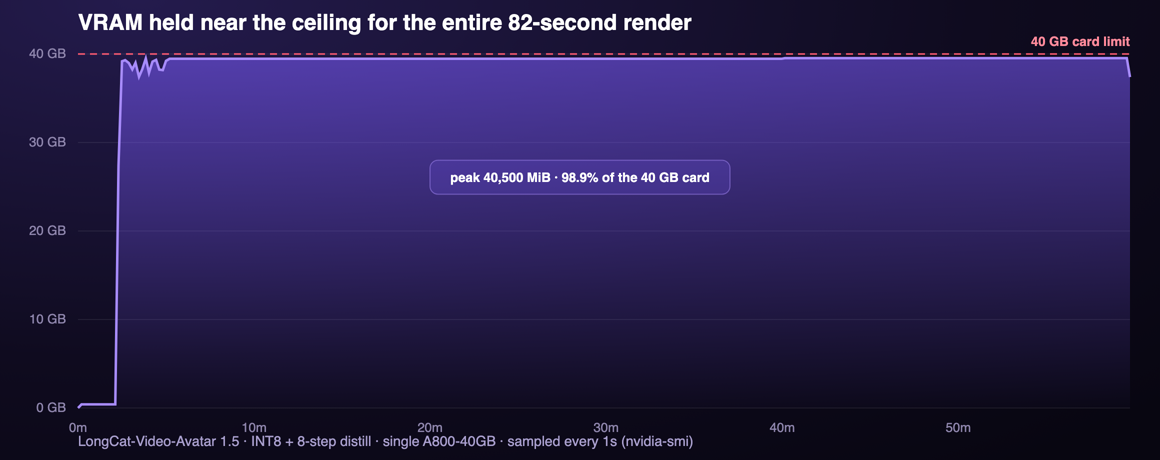
- Out-of-memory on the second segment. Long clips are built by continuing segment after segment, and the continuation step kept a 48-layer KV-cache resident. On a 40 GB card the second segment peaked the card and crashed — about 160 MiB short of fitting. We had to expose and enable an
--offload_kv_cacheflag (move the cache to CPU RAM and page it back per step) plus setPYTORCH_CUDA_ALLOC_CONF=expandable_segments:True. It works, at the cost of slower segments. - Resolution alignment. 480p under multi-card parallelism tripped a divisible-by-64 constraint on height and width; single-card avoids it.
Speed and memory (measured)
This is the number that matters: a 82-second clip took 3,586 seconds — just under an hour — on the A800, or about 44 seconds of compute for every 1 second of finished video (roughly 138s per generated segment across 26 segments). A short 10-second clip would still be around 7 minutes. And it is not a light load: VRAM ramped up in seconds and then pinned at 40,500 MiB — 98.9% of the 40 GB card — for the entire render. Here is the actual usage we sampled once per second:
Samples we rendered
Every clip below was rendered by us on the A800 described above. To benchmark the model on its intended scenarios we drove them with the project's own official demo inputs (reference portraits and audio) rather than curating our own — so these are honest, un-cherry-picked outputs, not a highlight reel. The first two clips were each driven by their own reference photo:
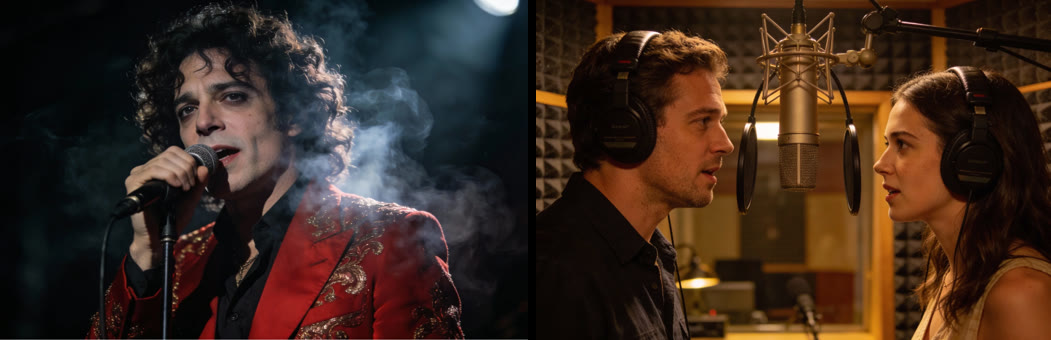
Left: the reference for the photo + audio clip. Right: the reference for the multi-speaker clip (one image, two people). The third clip below drove text + audio with no reference photo — the model invents the person, which is where it gets weakest.
Rendered by VisionStory with LongCat-Video-Avatar 1.5 on an NVIDIA A800, 2026-07-15, at 480p-class resolution (768×512 / 832×480), using the model's official demo inputs.
Honest verdict: strong with a photo, rough without one
What genuinely impressed us:
- Identity holds. In the photo-driven clip the person stays the same person across the whole 82 seconds — hair, wardrobe, face — while the mouth tracks the audio. This is the case that matters for avatars, and it works.
- Multi-speaker actually works. Two people from one scene, each lip-driven by its own audio track, stayed coherent — a genuinely hard thing to get right.
- MIT and commercial-grade. Open weights, no per-render billing, and output quality that would pass in a short clip.
Where it falls down — and these are real:
- Text-only generation drifts. Without a reference photo the model invents the person, and over a long clip the face warps into an uncanny, waxy close-up and the scene shifts — visible in the third sample above.
- It is slow and heavy. ~44s of compute per 1s of video, pinning a 40 GB card the whole time. An 82-second clip is an hour.
- 40 GB is the floor. Our run needed INT8 + distill just to fit, and multi-segment clips only survived by offloading the KV-cache to CPU. Smaller cards are out.
- Single-card only, in practice. Multi-GPU context-parallel deadlocked on our box, so there is no easy way to make one clip faster by adding cards.
- No voice. It drives lips from audio you supply — it does not do text-to-speech or voice cloning, so you still need a separate voice source.
- 480p, at this hardware. What we could run on a single 40 GB card was 480p-class output.
Self-host LongCat vs a hosted tool: which should you pick?
Both produce the same thing — a photo plus audio becomes a talking video. The difference is entirely in what it costs you to get there. A hosted tool like VisionStory runs the model for you; here is the honest trade-off.
| LongCat (self-host) | VisionStory (hosted) | |
|---|---|---|
| Hardware | A 40 GB A100/A800 (thousands of dollars) | None — runs in the browser |
| Setup | CUDA, flash-attn, INT8, dep fixes, OOM tuning | Sign in and go |
| Time per clip | ~44s compute per 1s of video (82s clip ≈ 1 hour) | Seconds, on hosted GPUs |
| Resolution (our run) | 480p-class | HD and up |
| Voice | You supply the audio (no TTS/clone) | Built-in voices and voice cloning |
| Commercial use | Yes (MIT) | Yes (per plan) |
| Maintenance | You patch deps, OOM, drivers | None |
| Best when | You have GPUs and need self-hosted/offline/on-prem | You want a finished talking video, fast |
Choose LongCat if you have the hardware and the work genuinely must be self-hosted — on-prem, offline, or fully under your control — and you are comfortable maintaining a CUDA stack. Choose a hosted tool if you want the same photo-plus-audio talking video without an hour of compute and a five-figure GPU.
What LongCat taught us
The real lesson from running LongCat-Video-Avatar is that open avatar-video quality has arrived — with a reference photo, this free model produces clips good enough for real use. The model is no longer the hard part.
The hard part is everything around it: fitting a video-diffusion model onto a card you can afford, surviving OOM on the second segment, waiting an hour for 82 seconds, and pairing it with a voice. That gap — between a capable checkpoint and a finished talking video anyone can make — is exactly the work we do. If you want to see the other side of it, VisionStory turns a photo and a script into a lip-synced talking avatar in your browser in seconds, and if you need the voice too, our teardown of open-source TTS covers where that half now stands.
